Turn one take into a whole session.
A vocal studio for Mac. Record your voice, build harmonies, and bring editable tracks into your DAW.
Hear the harmony stack
One recorded lead. Two backing parts rendered in Irie Control.
Come Inside (pell) by Madam Snowflake · CC BY 3.0. Excerpted, harmonized, and mixed.
Inside the Mac studio
Follow a vocal from the record deck to live effects, session exports, and plugins.
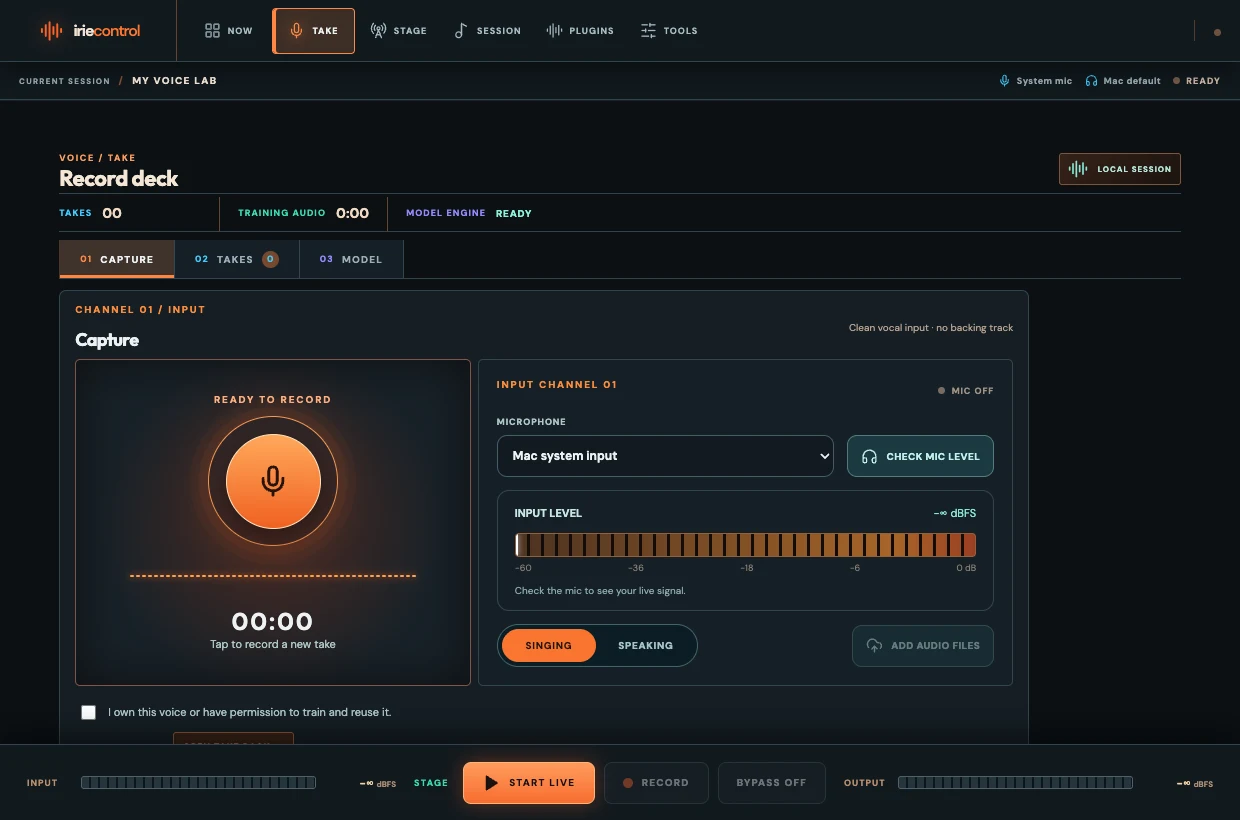
Studio tools
Arrange harmonies, split stems, or turn a recording into editable MIDI. Tools marked Mureka and Choir Studio’s text mode require a configured provider account.
Create
- Voice SwapLocal
Revoice a take or blend two trusted local voice models.
- My Voice LabLocal
Record vocals and train your own voice model locally.
- IrieTune StageLocal beta
Process a live microphone with presets, tuning, delay, and reverb.
- Choir StudioLocal beta
Arrange up to four backing parts from one vocal.
- AI Song GeneratorMureka
Turn lyrics and a style into a produced track.
- Drum Kit CloneLocal beta
Extract drum hits and build an editable sample kit.
Edit
- Pitch ControlLocal beta
Tune a solo vocal to your song’s key and scale.
- Swap LyricsMureka
Request a new remix with replacement lyrics.
- Split StemsLocal
Separate a track into musical elements.
- Song to MIDILocal
Estimate melodies or chords from a solo recording.
- Slop MachineLocal beta
Play and sequence a sample pack.
- Session DeskLocal
Export a reference mix, stems, and available MIDI in a ZIP for your DAW.
Analyze
- Key & BPM FinderLocal
Estimate tempo and musical key.
- Lyrics TranscriberMureka
Extract the words from a song.
What has been tested?
On Apple silicon, we verified local choir, stem, pitch correction, drum and sample renders, a three-note MIDI chord, and a Session Desk ZIP with bass MIDI. We confirmed a saved voice model and completed local Voice Swap renders. The two-voice blend passed with test inputs. Singing quality and DAW import still need a listening and session check.
IrieTune plugins for your DAW
Tune a vocal, add key-aware harmonies, or shape it with EQ, dynamics, and reverb. The IrieTune VST3 beta runs in a compatible DAW. Stage has its own live effects.
Open the Plugins screen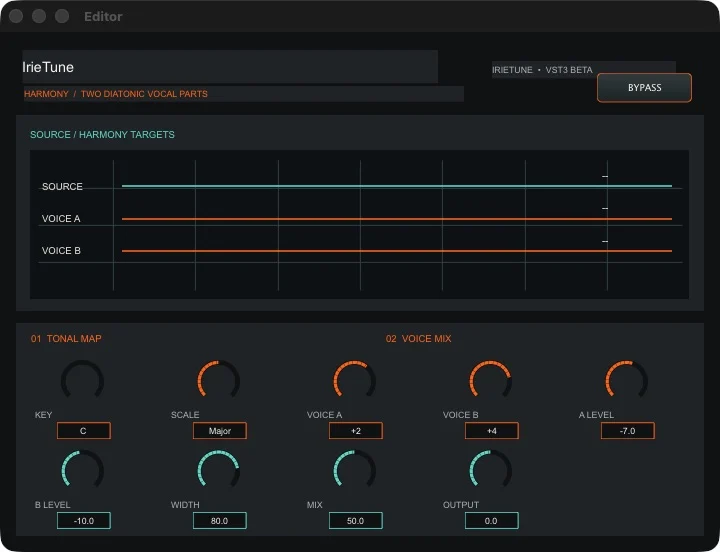
All 14 IrieTune effects
All 14 passed Steinberg’s VST3 validator on the test Mac.
- Pitch CorrectorLive tuning, manual note grid, vibrato shaping, and experimental formant balance.
- AutoKeyListen for a key and scale, with live chroma bars and an adjustable focus range.
- HarmonyAdd two diatonic vocal parts with independent intervals, levels, and stereo width.
- DoublerThicken a vocal with two independently delayed and drifting voices.
- Voice ChainRun high-pass filtering, de-essing, compression, and presence in one path.
- Vocal ReverbSet predelay, room, decay, damping, diffusion, and stereo width.
- VocoderShape a twelve-band voice synth with an internal carrier and MIDI note input.
- De-EsserReduce sibilance with split-band detection, timing, and listen mode.
- Vocal CompressorControl dynamics with soft knee, sidechain filter, makeup, and parallel mix.
- Vocal EQShape the high-pass, low shelf, mid bell, and air shelf on a response graph.
- Radio VoiceBand-limited vocal color with adjustable saturation, tone, mix, and output.
- Robot VoxRing-modulated vocal with carrier frequency, depth, filtering, and mix.
- Auto WahMoving vocal filter with rate, sweep, resonance, and mix controls.
- Pulse TremoloRhythmic level movement with rate, depth, shape, and stereo phase.
Separately installed LYNX VST3s
The Plugins screen shows these effects when you install them for your DAW.
- LYNX EchoformDelay
- LYNX AtriumReverb
- LYNX Crest CompressorDynamics
Mac beta access
Public downloads are pending. If you have the beta installed, open it here or find Irie Control in Finder’s Applications folder.
Open Irie ControlPricing
$30 / month planned
Subscriptions are closed.
The plan is for the Mac voice studio, including your take library, owned voice models, and local audio exports.
Studio FAQ
Can I download the Mac app?
Irie Control is in local Mac beta. If you have the current beta installed, use Open Irie Control or find the app in Finder’s Applications folder. Public downloads are pending.
Can I use it from my phone?
You can browse this website and hear the demo on your phone. The current studio runs on a Mac. The mobile layout in the app is a preview.
Where do my recordings and voice models go?
Local tools save takes, models, and renders on your Mac. Provider tools such as song generation and lyric requests send the selected inputs to Mureka after you configure the integration.
What can I bring into my DAW?
Export the choir mix or each enabled harmony part as WAV. Session Desk packages the reference mix, separated stems, available MIDI, and a track manifest in one ZIP. Open the files in your DAW and check the timing against the reference.
Can I use someone else’s voice?
Use recordings and models you own or have permission to use. Voice Lab trains an RVC model from your takes, and Voice Swap accepts a trusted RVC model and a clean source vocal.